For owner-run remodeling businesses with crews of 1 to 5.
Spend fewer evenings on paperwork.
Estimates, change orders, schedules and payments in one app that works on your phone. Start with your next job.
Card required to start, nothing charged for 30 days. Rather talk first? Call or text (469) 967-4066.
The Garcia hall bath, this week

- Ana approved a heated floor on her phone+ $1,240
- The contract updated itself$19,640
- Deposit paid from her phone$7,360
Three things that eat your nights.
The extra work nobody signed.
Price it on site. The homeowner approves on their phone before anyone starts, and the final payment updates itself.
The deposit you're still chasing.
Send each payment as a link. They pay by bank or card, and the money goes to your own Stripe account.
The "when are you coming?" calls.
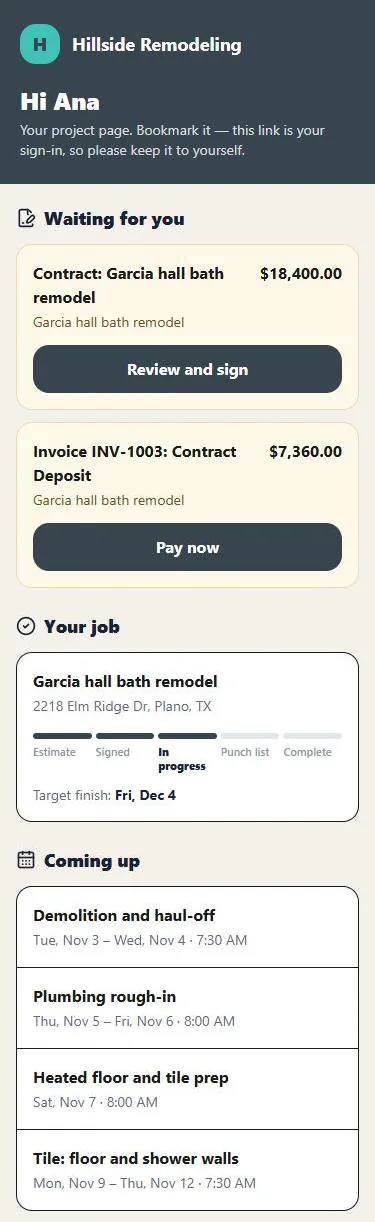
Every homeowner gets a project page with the schedule and what's waiting on them.

Hi, I'm Mark, the founder and a U.S. Air Force veteran. We built Remodel Command for owners who run the business and still work the job site. When you call, you talk to the people who build it, not a call center.
(469) 967-4066Follow an $18,400 hall bath through the app.
The three moments that matter most, in real screens from the app with a sample company and customer. Tap any screen to see it larger.
Send an estimate the homeowner approves online.
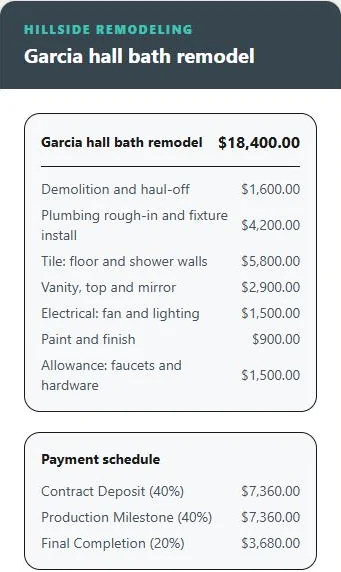
Line items, price and payment schedule in one link, such as 40% deposit, 40% mid-job and 20% at completion. They approve it on their phone, and their name, email and time are recorded.
Price the extra work before anyone starts it.
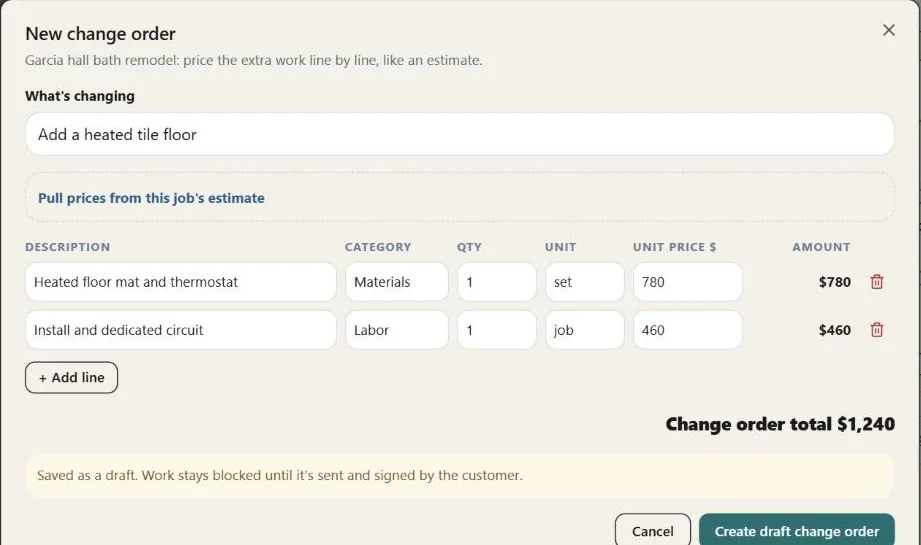
Ana asks for a heated tile floor. You add it as two lines and send it. The work stays blocked until she signs, then it's added to the contract and the final payment.
Swipe sideways to see the whole screen
You: two lines, $1,240.
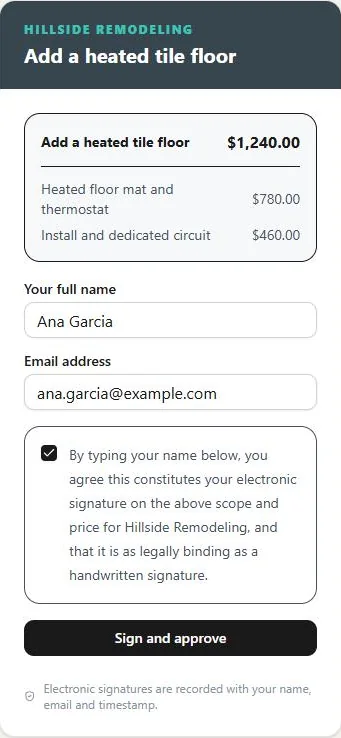
Ana: signs on her phone.
Send each payment as a link. They pay by bank or card.
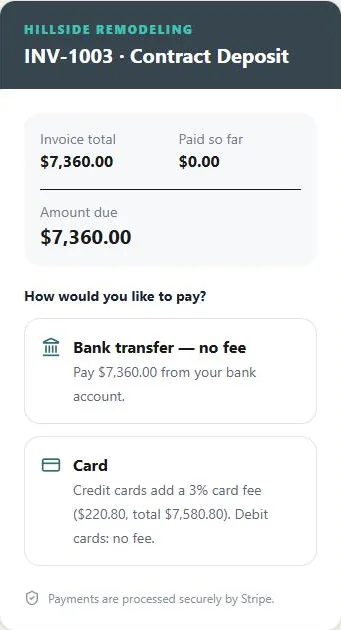
Bill the deposit straight from the payment schedule. Bank transfer costs the homeowner nothing, you can pass the card fee on to them, and the money goes to your own Stripe account. We take no cut.
See the rest of the jobYour crew schedule and the homeowner's project page
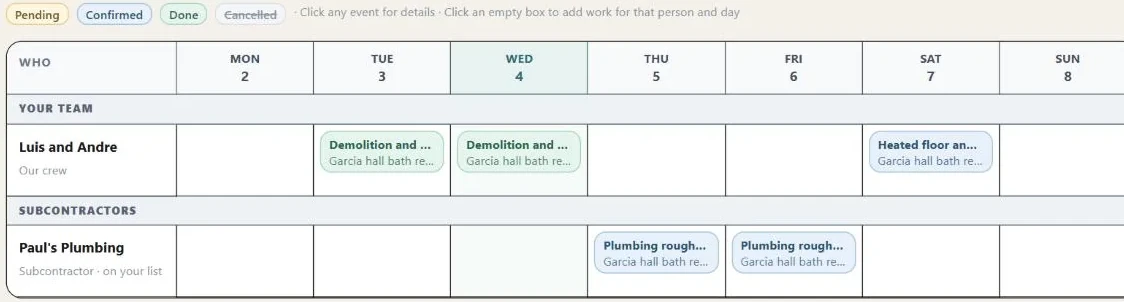
Your crew and your subs on one calendar.
See who's where this week. The homeowner sees the same dates on their project page.
Swipe sideways to see the whole screen
Fewer "what's next?" calls.
Every homeowner gets a project page with your name on it: what they need to sign or pay, where the job stands, the target finish and who's coming when.
We set it up with you.
You don't have to figure it out alone or give up a weekend. Here's what we do together.
- Your companyLogo, colors, payment schedule and contract terms.
- Your first estimate templateBuilt from your price sheet or an estimate you've already sent.
- Your first job, togetherStart with your next job. Your other jobs can stay where they are.
- Your crew invitedEach person added with the right access.
- Online payments, when you want themWe connect Stripe with you. It's optional: estimates, change orders and schedules work without it.
Have ready: your price sheet or a recent estimate, your logo, and the details of your next job.
After you start your trial
- Add your company name.
- We contact you to pick a setup time.
- We set up your company and your first job together.
Questions first? Text us anytime.
(469) 967-4066Text or email anytime. When you'd rather talk it through, we keep our call times for when you're off the job site: weekday evenings 4–7 PM and Saturday mornings 9 AM–12 PM Central. Email support@remodelcommand.com.
5 users: you plus four people on your team.Everyone who signs in counts, including subcontractors you invite. $10 a month for each extra person. Homeowners and their project pages are always free.
- Free trial
- 30 days. A card is required to start, and nothing is charged until day 31.
- Setup
- Guided setup is free when you join in 2026. From 2027 it's a one-time $199.
- Payments
- We take no cut. Stripe's standard fees apply when customers pay online, and you can pass card fees on to the customer.
- Canceling
- One click in the app. No contract and no phone call.
- Your records
- If you stop paying, you get 60 days of read-only access to view and export everything. After that the company is paused. Your records stay saved and come back if you restart.
Card required. Nothing charged for 30 days.
Monthly price for a five-person team.
| Software, 5 users | Per month |
|---|---|
| Remodel Command HQ5 users included, billed monthly | $99 |
| JobTread$199 with 1 user, plus $20 for each additional user, billed monthly | $279 |
| JobberGrow plan (includes job costing), 2–5 people, monthly with no commitment | $299 |
| Houzz ProPro plan, $199 with 1 user, plus $50 for each additional user | $399 |
| BuildertrendPrice not published | Call sales |
From each company's own pricing page, checked November 4, 2026. Some charge less with annual billing or other plans, and some include extras such as free subcontractor or field users. Features differ, so compare what matters to your business.
What's the hardest part of running your remodeling business?
You know where the headaches are: the work that takes too long, the details that get missed, and the problems that keep coming back.
Tell us one thing you wish were easier. Your feedback helps us decide what to improve and build next in Remodel Command.
Thank you. We read every one.
What you shared goes straight to the people who build Remodel Command.
Questions, answered.
Text (469) 967-4066 or email support@remodelcommand.com anytime. Want to talk? We keep our call times for when you're off the job site: weekday evenings and Saturday mornings, Central time.
Who is this built for?
Owner-run remodeling businesses with a crew of one to five: kitchens, baths, basements and whole-home remodels. If you run jobs during the day and do the office work at night, it's built for you.
Who counts as a user?
Everyone on your team who signs in, including you and any subcontractors you invite. $99 covers five of them. Homeowners using their project page don't count and are always free.
Are there any other fees?
We don't take a cut of your payments. When customers pay online, Stripe's standard processing fees apply, and you can choose to pass card fees on to the customer. Guided setup is free if you join in 2026; from 2027 it's a one-time $199.
Do I need to install anything?
No. It works in the web browser on a computer, tablet or phone. On a phone you can add it to your home screen and it opens like a regular app.
What happens to my records if I cancel?
You get 60 days of read-only access to view and export everything. After that the company is paused, not deleted. Your records stay saved and come back if you restart your plan.
Try it on your next job.
Free for 30 days. Setup included.